
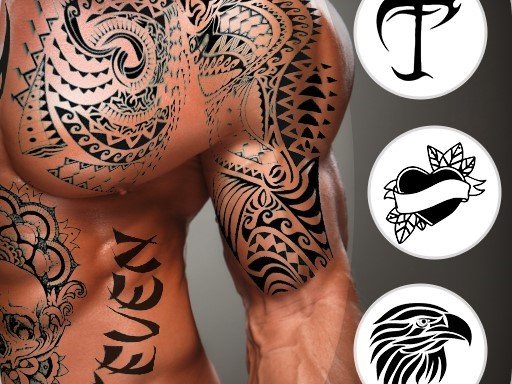
Virtual Body Art Creator
Reviews
Virtual Body Art Creator offers a safe and creative way to experiment with body art designs on your own photos. The interface is intuitive, making it accessible for all ages. The large design library and customization options allow for endless creativity. It is a perfect tool for anyone curious about body art without any commitment.
About this game
Game Introduction
Virtual Body Art Creator is a safe, family-friendly online tool that allows players to experiment with artistic designs on their own photographs. The core objective is to explore creative self-expression without any physical commitment or discomfort. What makes this game unique is its focus on personal style through an extensive library of design options and guided inspiration. It is suitable for all ages, offering a risk-free way to try different artistic looks on personal images. Players can upload their own photos or use built-in examples to see how various designs appear on different body areas. The game encourages creativity and experimentation in a completely safe environment.
How to Play
To begin, players typically upload a clear photo of themselves or select one from a provided gallery. They then browse through various design categories such as animals, flowers, and symbols. Using simple drag-and-drop controls, a chosen design can be placed onto the photo. Players can adjust the size, rotation, and position to make the design look natural on the skin. Color changes and effects are available to match personal preferences. Once satisfied, the final image can be saved to the device. The interface is intuitive and requires no special skills.
Game Features
The game includes a large collection of design options organized by categories for easy browsing. It offers guided inspiration to help players explore creative possibilities. Players can upload their own photos or use built-in gallery images. Drag-and-drop placement with resize and rotate tools allows precise positioning. Color customization and effects are available for personalization. The game is free to play with no downloads or installations required, making it accessible on any device. It is designed to be safe for all ages with no inappropriate content.
Tips for Success
For the best results, start with a well-lit, clear photo for accurate placement. Experiment with different design categories to find styles that suit you. Use the resize and rotate tools to make the design blend naturally with body contours. Try various color combinations and effects to see what matches your personal taste. Save multiple versions of your design to compare options. Practice with different photos to improve placement skills. Most importantly, have fun exploring creative possibilities without any risk.







Comments
Sign in to leave a review
No account? Create one
No comments yet.